Payment monitoring
Track money across distributed systems.
Reconify monitors payment flows across your services, payment providers, wallets, and ledgers. It reconstructs each financial operation from its evidence, verifies the expected outcome, and gives your team the context to investigate when something breaks.
14-day Team trial · No credit card required · Unlimited submitted events
 app.reconifyhq.com/integrity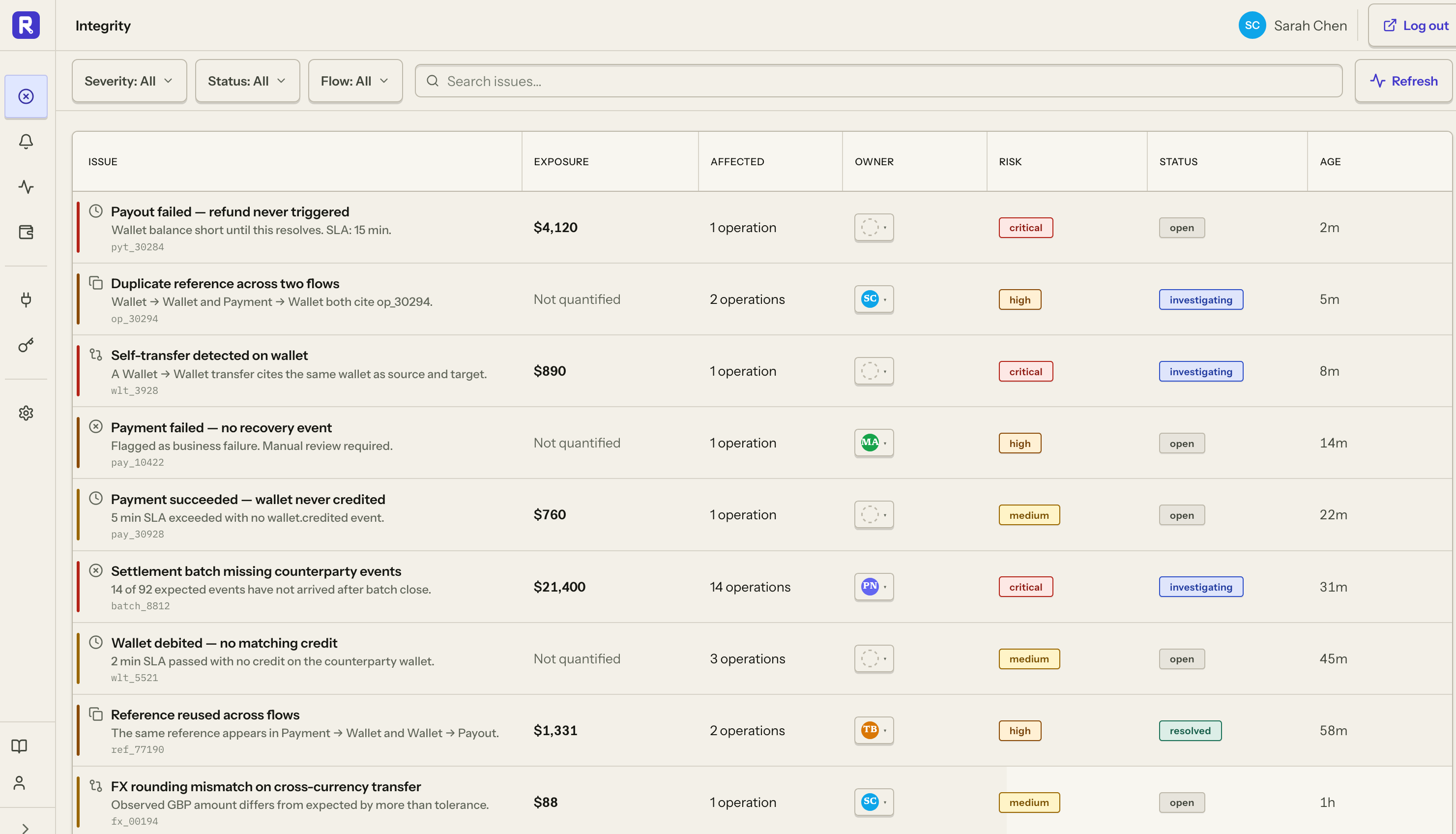
Payment succeeded. Wallet credit missing.
wallet.credited overdue | finding open
Reconify knows what should happen next.
Define the expected stages of a payment flow and the deadline for each outcome. Reconify continuously evaluates incoming evidence against that flow, identifying the missing outcome instead of waiting for a customer, support ticket, or reconciliation run to reveal it.
Define the expected stages.
Describe the evidence and deadline expected at each stage of a payment flow.
Detect missing and late outcomes.
Reconify evaluates incoming evidence against the expected operation and its deadline.
Surface duplicate evidence.
Retry the same stable event safely while keeping duplicate evidence visible for investigation.
Keep financial context connected.
Amounts, currencies, references, and targets stay attached to the same operation.
Alert the right people when a finding opens.
Alert the right people.
Route findings to the teams that need to investigate a broken payment flow.
import { ReconifyClient } from "@reconifyhq/sdk";const client = new ReconifyClient({ apiKey: process.env.RECONIFY_API_KEY,});const result = await client.ingestion.ingestMonitoringEvents({ body: { events: [paymentEvent], },});Send evidence asynchronously.
Keep monitoring outside the critical payment path while your systems continue executing payments.
When money stops where it should not, Reconify shows you where.
Payment failures are not always failed API requests. Reconify detects breaks in the expected flow and opens a finding around the affected financial operation.
Missing outcome
wallet.credited never arrived
Late outcome
settlement.completed arrived after SLA
Amount mismatch
provider and ledger disagree
Duplicate evidence
the same financial event was observed twice
Conflicting evidence
systems report incompatible outcomes
The investigation starts with the timeline already reconstructed.
Reconify connects the evidence around the affected operation before your team starts investigating. Provider references, internal events, wallet movements, amounts, timestamps, expected stages, and findings stay attached to the same financial operation.
See where it broke.
Reconify reconstructs the operation event by event, showing the expected step, what actually occurred, and where the evidence stopped.
- Expected stage and deadline
- Occurred and received times
- Late and missing evidence separated
payment.initiated
$142.50 · pay_8821
provider.succeeded
ch_3Q8F
wallet.credited
SLA 5m
operation.status
Finding created
Know what's affected.
See the amount, currency, affected wallet or order, deadline, and current status so your team can understand the financial exposure and prioritize accordingly.
- Affected wallet or order
- Amount and currency
- Finding status and deadline
$142.50
Wallet credit missing
- 1 operation
- pay_8821
- 1 wallet
- wal_2048
- SLA exceeded
- 5m late
Investigate from the same evidence.
Provider references, internal events, amounts, timestamps, and affected targets stay connected to the operation, giving support, engineering, and finance the same evidence trail.
- Provider references linked
- Wallet and order events preserved
- One timeline for every team
Provider | Stripe
Wallet | WAL_2048
See the technical failure in its financial context.
Reconify preserves the affected amount, currency, provider or ledger target, operation references, timestamps, and deadline alongside the technical evidence.
Stable event identity
Reconify makes exact retries identifiable and surfaces changed payloads as conflicts.
Operation relationships
Reconify connects evidence from providers, services, wallets, ledgers, and orders.
Financial context
Reconify preserves exact decimal amounts, currencies, targets, and provider references.
Two useful times
Reconify separates when an event occurred from when it was received.
Provider references
Keep provider transaction IDs and internal references attached to the operation.
Immutable evidence history
Trace monitoring decisions back to the evidence that produced them.
Your customer should not be your payment monitoring system.
Without continuous payment monitoring, incomplete financial operations often surface only after someone notices the consequence. Reconify detects the break from evidence and gives your team the affected operation to investigate.
- Customer reports a missing balance
- Support checks the payment provider
- Engineering searches logs
- The wallet or ledger is inspected
- References are compared manually
- Someone reconstructs the payment timeline
- The expected deadline passes
- Reconify detects the missing outcome
- The affected operation is identified
- Provider and internal evidence are already linked
- The team receives an alert
- The investigation opens with the timeline attached
Alert the team when a payment flow needs attention.
Reconify notifies the right people when an expected financial outcome is missing, late, mismatched, duplicated, or conflicting. The alert points back to the affected operation and its evidence.
Slack
Route findings to the team channel that owns the flow.
Keep operators informed when an expected outcome needs attention.
Monitor the systems your money already moves through.
Connect payment-provider evidence with events from your own services, wallets, ledgers, and financial infrastructure. Reconify keeps those signals connected to the same financial operation so provider success can be verified against what happened inside your systems.
 StripeStripe-mirror
 Paddle
 PaystackPaddle-mirrorPaystack-mirror
 Flutterwave
 FedaPayFlutterwave-mirrorFedaPay-mirror
Keep Reconify outside the critical path.
Your financial operations do not depend on Reconify to complete. Send evidence asynchronously after money moves, retry safely, and scale ingestion independently of your payment path.
Asynchronous · Retry safe · Outside the critical path
Send the payment events your systems already emit.
Reconify sits outside the critical payment path. Send financial events asynchronously through the public API or an SDK while your existing infrastructure continues to execute payments.
The payload is small. The details matter.
Hover or focus a field to see why it belongs in every reliable event.
Payment monitoring for production teams.
Team starts with one production payment system. Business and Enterprise add multiple workspaces, advanced workflows, and reconciliation access.
Team
For teams monitoring one production payment system.
Billed monthly
- 14-day free trial
- Unlimited submitted events
- Production monitoring
- Finding investigations
Business
RecommendedFor teams monitoring multiple payment systems and advanced workflows.
Starting at $1,000/month
- Multiple workspaces
- Reconciliation workflows
- 1-year evidence retention
- Advanced routing and automation
- OIDC single sign-on
Enterprise
For organizations with custom deployment, retention, and support requirements.
Billed monthly
- Custom support policy
- Custom retention policies
- Security and compliance reviews
- Custom integration review
Payment monitoring questions
How Reconify fits into your stack, what it monitors, and what happens when a payment flow breaks.
Payment monitoring tracks the state of a payment as it moves across the systems involved in completing the financial operation. Reconify monitors evidence from payment providers and internal systems, reconstructs the operation, and verifies whether expected outcomes happened.
Know when a payment flow breaks.
Send the events your systems already emit. Reconify monitors the expected outcomes and gives your team the evidence to investigate when something does not happen as expected.
14-day Team trial · No credit card required · Unlimited submitted events